
NetSuite integration platform: what it is, and how it compares to an iPaaS
The NetSuite Integration Platform is Oracle’s own low-code product for connecting NetSuite to other business systems. Oracle announced it on February 11, 2026 and offers it as an add-on. An integration platform as a service, or iPaaS, is the wider category: cloud tools for connecting applications, systems and data sources. So when someone says “NetSuite iPaaS”, they can mean Oracle’s product, a general-purpose iPaaS with a NetSuite connector, or something in between.
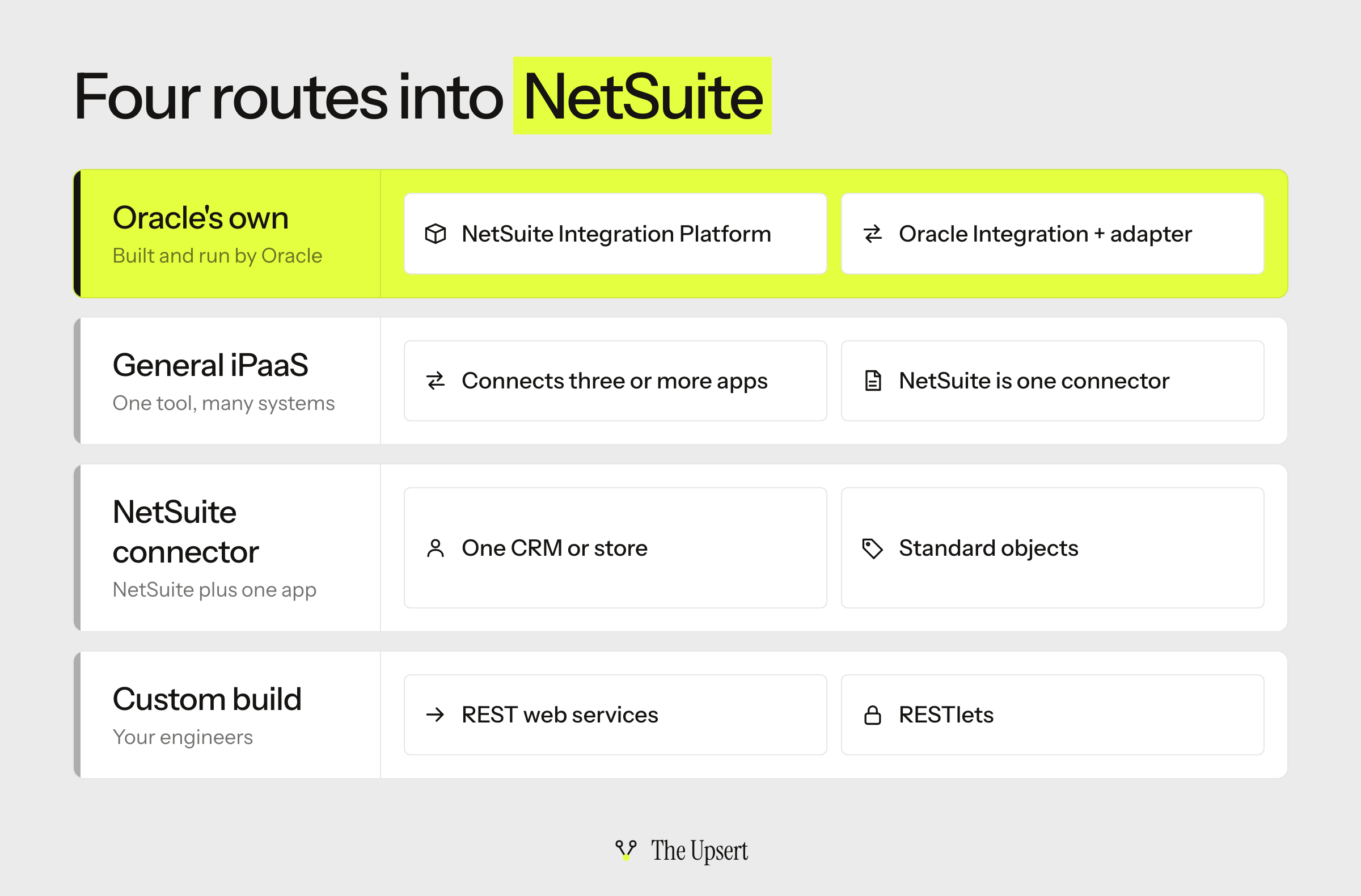
This guide sorts that out. There are four routes into NetSuite: Oracle’s own options, a general-purpose iPaaS, a connector built for NetSuite, and a custom build on NetSuite’s APIs. The differences between them are smaller than the sales pages suggest, because NetSuite’s own limits apply to every route. You’ll get those limits, four questions to ask any vendor, and a table to choose.
It’s for NetSuite admins, RevOps and finance-systems leads who have to pick a tool, or who inherited one and want to know what it should be doing.
What Oracle’s own options are
Oracle has two. The NetSuite Integration Platform is the new one. Oracle describes it as low-code and AI-assisted, with prebuilt integrations to third-party CRM, ecommerce, HR, supply chain and industry systems, and an assistant that helps with mapping, documentation and error summaries. It’s offered as an add-on module. At launch Oracle listed availability in North America, Australia and New Zealand, and the UK and Ireland, so check that yours is covered. Because it is new, ask for references and run your hardest flow in a sandbox before you commit.
The other is Oracle Integration, a separate Oracle Cloud product. Oracle documents a NetSuite adapter for it that you add to an integration built in Oracle Integration. It’s worth a look if you already run Oracle Integration for other systems.
What a general-purpose iPaaS adds
The main reason to choose one is scope. NetSuite is rarely the only system. A CRM, a billing tool, a warehouse and an online store all want the same customers and orders. One platform that connects all of them gives you a single place to map, monitor and fix.
The cost is that the NetSuite connector is one of many, so ask how deep it goes: custom records and fields, subsidiaries, and which NetSuite API it calls.
A connector built for NetSuite is narrower. It links NetSuite to one other application, such as a CRM or a store. It’s the quickest to switch on when your needs are standard, and it comes with the same trade-off as the native sync in the HubSpot NetSuite integration guide: fast, until you need something it doesn’t cover. The Salesforce NetSuite guide does the same for Oracle’s own Salesforce connector.
Four questions to ask any tool before you sign
These come from NetSuite’s own documentation, so they apply whether the vendor is Oracle, an iPaaS provider or a consultancy.
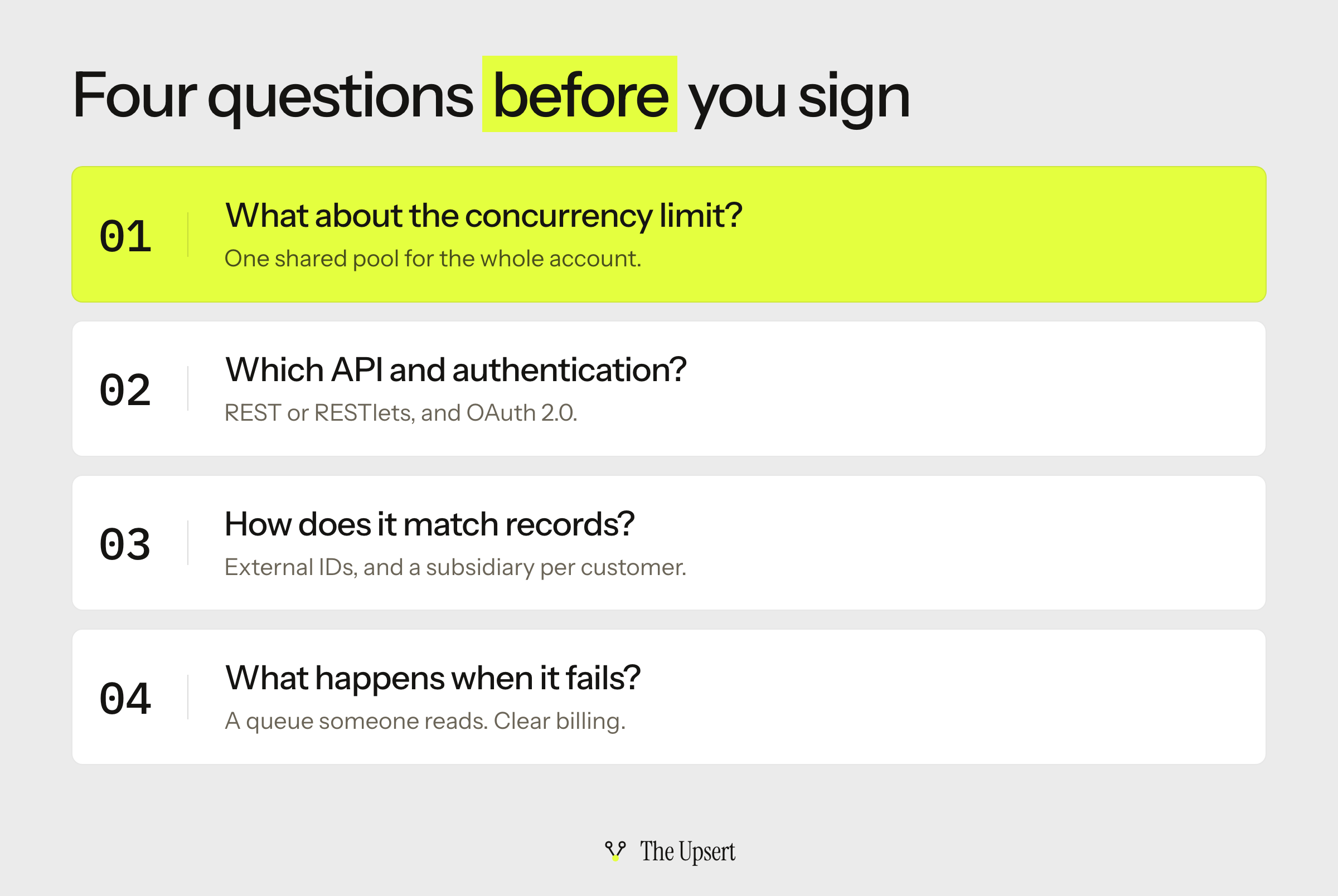
How does it handle NetSuite’s concurrency limit?
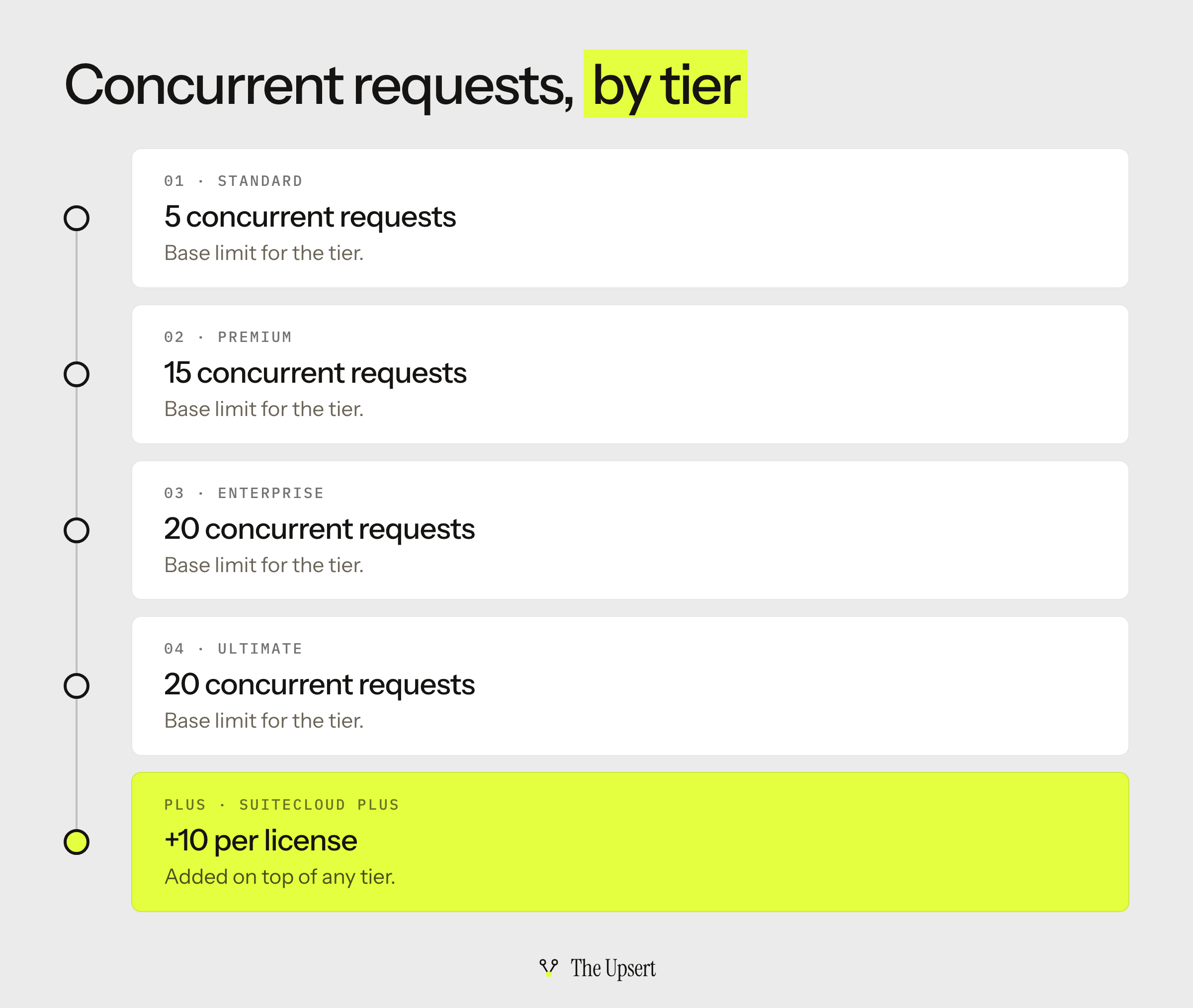
NetSuite governs web services and RESTlet requests together at the account level. The base limit depends on your service tier, and each SuiteCloud Plus license adds 10. On the newer tiers the base is 5 for Standard, 15 for Premium, and 20 for Enterprise and Ultimate. Development and partner accounts stay at 5.
Every integration you run shares that pool, so a bulk load from one tool can starve another. Oracle lets you allocate part of the limit to a single integration, so ask whether the tool works with that setting. And ask what it does when it hits the ceiling: queue and retry, or fail.
Which NetSuite API does it use, and how does it authenticate?
Oracle lists four ways to bring data into NetSuite:
| Channel | What Oracle says | For a new integration |
|---|---|---|
| CSV import | The most common way to move small or medium data sets in | Occasional loads, not a live sync |
| REST web services | An integration channel that extends SuiteTalk | The route for new work |
| RESTlets | Custom logic exposed to outside applications over HTTP | When you need logic on the NetSuite side |
| SOAP web services | Oracle is gradually removing them in favor of more modern channels | Avoid for anything new |
Authentication is changing too. Oracle says that from 2027.1 no new token-based integrations can be created for SOAP web services, REST web services or RESTlets, that existing ones keep working, and that new ones should use OAuth 2.0. A tool that relies on SOAP, or on token-based authentication for new connections, is building on channels Oracle is retiring.
How does it match records?
Names change and IDs don’t. NetSuite identifies a record by its external ID and record type, so a tool that writes with an external ID can create or update the same record every time. It’s the rule behind one writer per field, applied to identity.
If you run OneWorld, each customer needs a subsidiary before it can have transactions, and the primary subsidiary can’t be changed once a transaction is posted. Ask how the tool sets it.
What happens when a sync fails, and how is it billed?
Two practical questions. First, visibility: where do failed records go, who sees them, and how quickly? An error queue someone reads beats a log nobody opens. Second, cost: Oracle’s platform is an add-on, and other tools bill by volume, by connection or at a flat rate. Ask how usage is billed and price it at your real record counts, not the demo’s. Also ask who maintains the flows after launch.
NetSuite Integration Platform, iPaaS, connector or custom: how to choose
| Route | Choose it when | You still own | Watch for |
|---|---|---|---|
| NetSuite Integration Platform | You want Oracle to run the platform and your other systems are among its prebuilt integrations | Mappings, testing, and who owns each field | It’s new (February 2026): ask for references and check regional availability |
| Oracle Integration + NetSuite adapter | You already run Oracle Integration for other systems | The integrations you build in it | A second Oracle product to license and learn |
| General-purpose iPaaS | More than two systems need the same data, or you need custom fields and logic | Mappings, monitoring and the error queue | How deep the NetSuite connector goes; usage-based billing |
| Connector built for NetSuite | Standard objects between NetSuite and one other application | Field ownership, matching and subsidiaries | What it doesn’t cover; it links two apps only |
| Custom API build | Unusual logic or volume, and engineers who will maintain it | Everything: ordering, retries, alerts, upgrades | Building on retired channels; the concurrency ceiling |
My default for a team with two or three systems and no developers is to start with Oracle’s platform or an iPaaS and run one real flow in a sandbox before deciding. If you only need NetSuite connected to a single CRM, look at the connector first. The HubSpot guide shows how that plays out for one pair.
Before you sign: a checklist
- You know your account’s concurrency limit and how many SuiteCloud Plus licenses you have.
- The tool uses REST web services or RESTlets, not SOAP, and OAuth 2.0 for new connections.
- Records match on an external ID, not on names.
- Every customer gets a subsidiary before it syncs (OneWorld).
- You ran your hardest flow in a sandbox.
- Failed records land in a queue and someone is alerted.
- You know how usage is billed at your real volumes.
- Someone specific owns the integration after go-live.
Start with your hardest flow
Pick the flow most likely to break: the one with custom records, several subsidiaries or the highest volume. Run it in a sandbox in each tool you’re considering. The tool that handles that flow, and shows you clearly when it fails, will handle the easy ones. The failures that apply to every route are listed in where CRM–ERP syncs break.
Frequently asked questions
What is the NetSuite Integration Platform (NSIP)?
It’s Oracle’s own low-code integration product for NetSuite, announced on February 11, 2026. Oracle describes it as AI-assisted, with prebuilt integrations to third-party CRM, ecommerce, HR, supply chain and industry systems, and offers it as an add-on module.
Is the NetSuite Integration Platform an iPaaS?
It plays the same role: a cloud platform for connecting NetSuite to other applications. iPaaS is the general category, and the NetSuite Integration Platform is Oracle’s own product for NetSuite. A general-purpose iPaaS is a separate choice, made by another vendor and covering more than NetSuite.
What API integrations are available for NetSuite?
NetSuite offers REST web services, RESTlets and SOAP web services, plus CSV import for data loads. Oracle says it is gradually removing SOAP web services in favor of more modern channels, so new integrations should use REST web services or RESTlets.
How many concurrent requests can NetSuite handle?
The limit is per account and covers web services and RESTlet requests together. The base depends on the service tier (5 for Standard, 15 for Premium, 20 for Enterprise and Ultimate), and each SuiteCloud Plus license adds 10. Development and partner accounts stay at 5.
Should I use OAuth 2.0 or token-based authentication?
Use OAuth 2.0 for new integrations. Oracle says that from 2027.1 no new token-based integrations can be created for SOAP web services, REST web services or RESTlets, and that existing token-based integrations keep working.
What are some examples of integration platforms?
There are four kinds for NetSuite: Oracle’s own (the NetSuite Integration Platform, or Oracle Integration with its NetSuite adapter), general-purpose iPaaS from other vendors, connectors built for NetSuite, and custom builds on NetSuite’s APIs. The right one depends on how many systems you connect and who will maintain the flows.