
Salesforce NetSuite integration: what Oracle’s connector covers, and where it stops
A Salesforce NetSuite integration keeps your CRM and your ERP on the same customers, orders and invoices, so a deal that closes in Salesforce becomes a sales order in NetSuite without anyone retyping it. Oracle publishes its own connector for this, the NetSuite Connector for Salesforce, and its documentation is the best source on what it does and doesn’t do.
This guide reads that documentation for you. You’ll get what each sync does and what sets it off, the setup in order, four things to settle before the first order, the errors Oracle’s own troubleshooting page lists, and a table to choose between the connector, a marketplace app, an iPaaS and a custom build.
It’s for Salesforce admins, RevOps and finance-systems leads who have to connect the two, or who inherited a sync and want to know what it should be doing.
What the connector syncs, and what triggers each sync
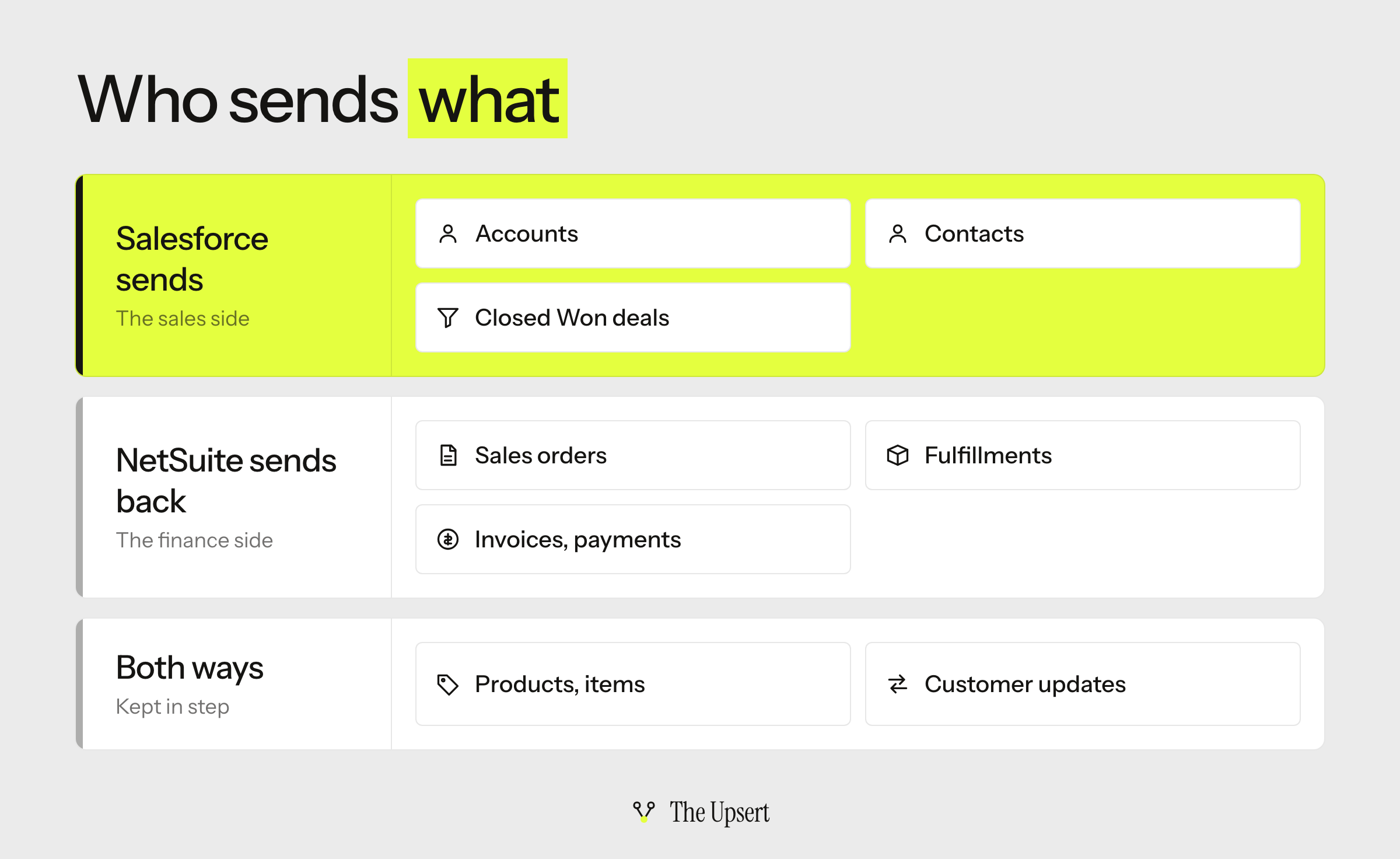
Oracle’s list of Salesforce connector syncs has twelve entries. These are the ones that carry a deal to cash:
| Sync | Direction | What Oracle says sets it off |
|---|---|---|
| Account to customer | Salesforce to NetSuite | An account is created or updated, or its billing or shipping details change |
| Customer to account | NetSuite to Salesforce | A customer is updated, or its billing or shipping details change |
| Product and item | Both ways | Two separate syncs; a product needs its NetSuite ID before an opportunity can sync |
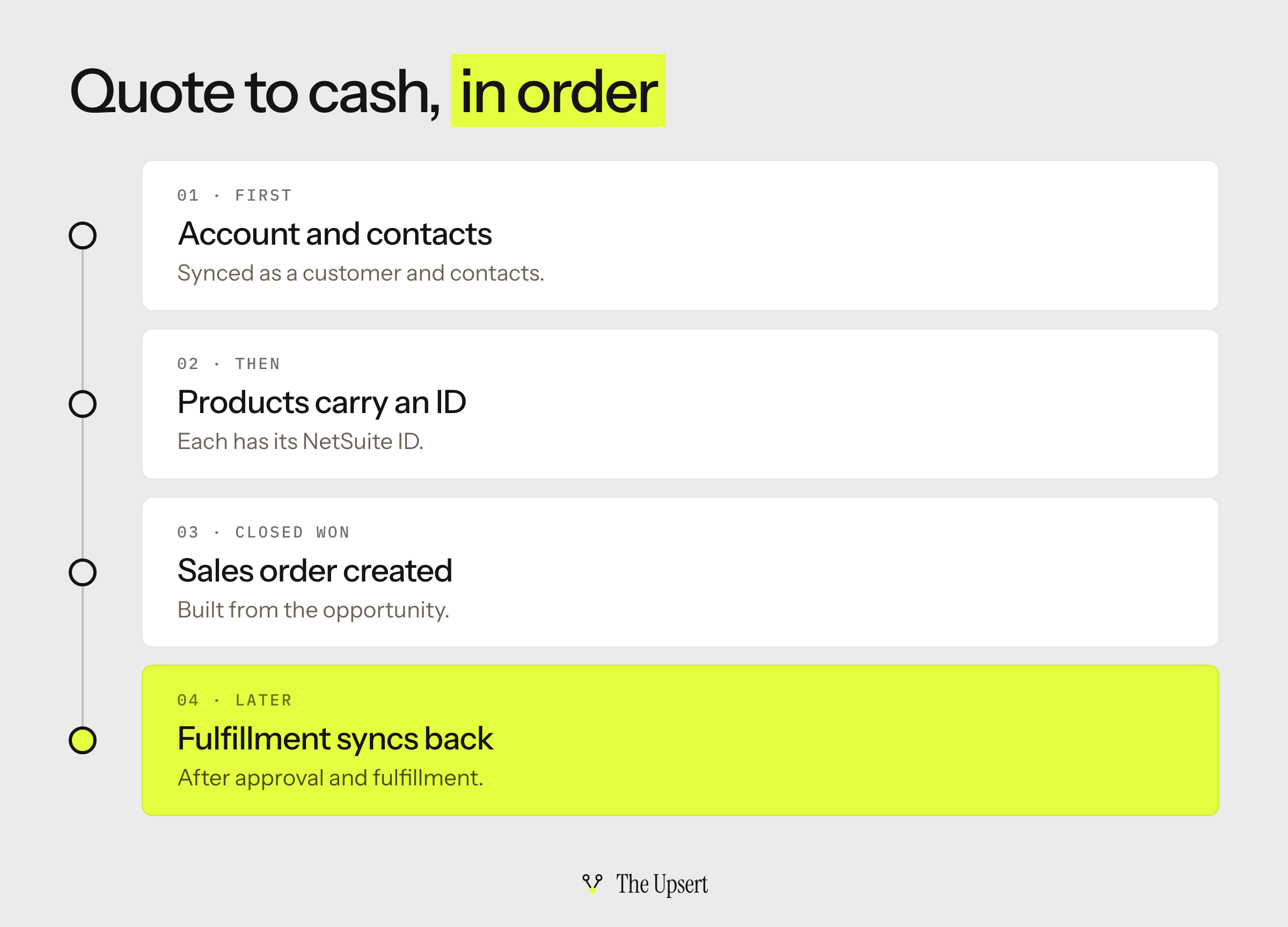
| Opportunity to sales order | Salesforce to NetSuite | The opportunity reaches Closed Won; later changes to it sync to the sales order |
| Sales order to order | NetSuite to Salesforce | The sales order created from the opportunity syncs back as an order |
| Fulfillment | NetSuite to Salesforce | The sales order is approved and fulfilled |
| Invoice, payment and cash sale | NetSuite to Salesforce | Each is its own sync into a financial record |
The order matters more than the list. Oracle’s order sync page says order syncs apply only to sales orders generated from a Closed Won opportunity, and that lookups must be defined in NetSuite for them to work. Anything earlier in the sales process, or an order that starts in NetSuite, is outside that flow.
What you set up before the first sync
Oracle’s setup has two hard requirements. All NetSuite accounts using the connector must be OneWorld accounts with at least one subsidiary, and your Salesforce edition must support API access. Oracle lists Enterprise, Developer and Professional, and notes that Professional has no API access by default.
Then the setup runs in this order:
- Verify that the required features are enabled in NetSuite and Salesforce.
- Install the NetSuite Connector Platform SuiteApp, in production or in a sandbox.
- Add an API-only integration user in Salesforce. It can’t log in to the Salesforce interface, which limits misuse.
- Create and configure an External Client App in Salesforce.
- Set up the dashboard portlets, once.
- Run the setup wizard. The import step can take several minutes, and the wizard doesn’t show a success message on its own, so you refresh until it does.
- Configure lookups and preferences, page layouts and permission sets.
- Sync your existing items from NetSuite to Salesforce.
Set it up in a sandbox first. Oracle’s page doesn’t say how often each sync runs, so measure that yourself before you promise anyone a timing.
Four things to settle before the first Closed Won
The documentation tells you what the connector does. These four questions cover what it leaves for you to decide.
How does the connector match a customer?
Oracle says the account to customer sync decides whether a customer is unique by the combination of subsidiary and customer name. It also stores the NetSuite internal ID in a custom field on the Salesforce account, and the Salesforce ID on the NetSuite customer, along with a sync status.
A name is the weakest kind of key, and it’s how duplicate customers start. Before you go live, test what happens when someone edits an account name on one side, and when two accounts share a name under the same subsidiary. The stored IDs are the ones to build reports and fixes on.
Where can a customer be created?
Oracle is direct about this. The customer to account sync only updates customer records that were synced from Salesforce, and if you create a new customer record in NetSuite, it won’t create an account in Salesforce.
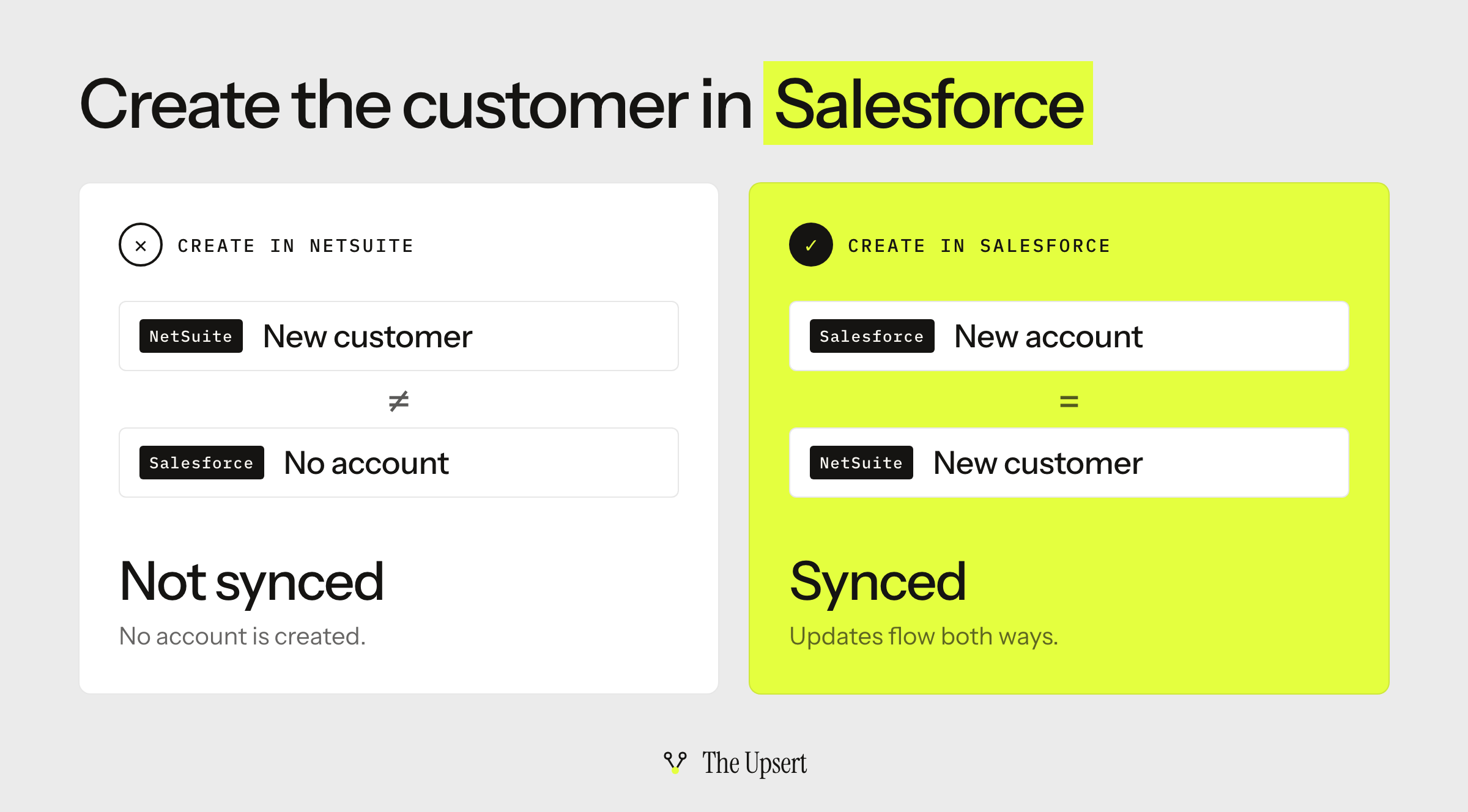
So new customers start in Salesforce, and finance needs to know it. If your billing team creates customers directly in NetSuite, you’ll have two lists that drift apart. This is the ownership question again: decide who creates each record before the first sync, not after the first mismatch.
What has to exist before a deal can become an order?
Oracle’s opportunity sync has prerequisites, and a deal that misses one won’t post:
- The account has synced to NetSuite as a company customer, and its contacts have synced.
- Every product on the opportunity has its NetSuite ID populated.
- With multiple subsidiaries, the NetSuite Subsidiary field on the opportunity is set. If it’s blank, an error shows and the opportunity doesn’t post.
- The lookups for order syncs are defined in NetSuite.
Put these into the Salesforce page layout as required checks, so a rep finds out at Closed Won, not when finance asks where the order went.
What limits does Salesforce put on it?
Salesforce limits API requests per org per 24 hours. For Enterprise Edition it starts at 100,000 and grows with your user licenses, and it’s counted across every integration on the org, not per user. REST, SOAP and Bulk API calls all count, and Salesforce also caps concurrent requests that run 20 seconds or longer at 25.
That makes it a budget shared with everything else that reads or writes Salesforce. Check what your other tools already use before you add one more. The same idea applies on the other side: NetSuite’s own concurrency limit is shared by every integration too.
Where Oracle’s own troubleshooting page says syncs fail
Oracle’s troubleshooting page for the connector is the best list of real failures. Read it before you go live. The main ones:
| What you see | The cause Oracle gives | The fix Oracle gives |
|---|---|---|
| An item created in NetSuite doesn’t reach Salesforce | The item sync isn’t enabled on the data syncs page, or the user event script is inactive | Enable the sync and make sure the script is active |
| An item with prices fails to sync | The price book lookup isn’t configured | Configure the NetSuite price levels lookup in the connector settings |
| “Invalid item reference key” on an opportunity | The account and the product are under different subsidiaries | Put the product and the account under the same subsidiary |
| “ContentNote is not supported” on an opportunity | Notes aren’t enabled on the Salesforce opportunity layout | Enable Notes in Salesforce |
| “Invalid currency code: -1” | The currency table isn’t configured in the lookup | Update the currency codes lookup and retry |
| An “AllOrNone” error on an item | One Salesforce price book is set for every NetSuite price level except base | Use a different price book for each price level |
Almost every row is a setup gap, not a bug, which is why the checklist below is mostly about setup.
Connector, app, iPaaS or custom API: how to choose
The connector runs on Oracle’s NetSuite Connector Platform SuiteApp. That is a separate name from the NetSuite Integration Platform that Oracle announced in February 2026, and the platform guide compares the two and the other routes into NetSuite.
| Route | Choose it when | You still own | Watch for |
|---|---|---|---|
| Oracle’s connector | You run NetSuite OneWorld and your flow is accounts, Closed Won orders, fulfillment and invoices | Where customers are created, lookups, required fields, the error queue | The documented order flow starts at Closed Won; matching is by subsidiary and name |
| A marketplace app (AppExchange or SuiteApp) | Standard objects between the two, and you want a vendor to support it | Field ownership, matching and subsidiaries | What it doesn’t cover; how it’s billed |
| General-purpose iPaaS | A third system needs the same data, or you need custom objects and logic | Mappings, monitoring and the error queue | How deep the NetSuite and Salesforce connectors go; usage-based billing |
| Custom API build | Unusual logic or volume, and engineers who will maintain it | Everything: ordering, retries, alerts, upgrades | Both platforms’ limits; OAuth 2.0 for new NetSuite work |
If you build it yourself, Salesforce’s upsert by external ID does the create-or-update in one call: it creates the record if the ID matches nothing, updates it if it matches one, and returns a 300 error if it matches several. That is the behavior you want from a matching key. On the NetSuite side, new integrations should use OAuth 2.0, and token-based authentication can’t be used for new integrations from 2027.1.
My default for a OneWorld team with a standard flow is to start with Oracle’s connector and run one Closed Won opportunity through a sandbox before deciding. If you need a third system, custom objects, or logic before Closed Won, price an iPaaS. The HubSpot guide shows the same decision for a different CRM.
Before you turn the sync on: a checklist
- Your NetSuite account is OneWorld, and your Salesforce edition has API access.
- The integration user is API-only, and the External Client App is set up.
- You decided where customers are created, and finance knows it.
- You tested what happens when an account name changes.
- Every product carries its NetSuite ID.
- The NetSuite Subsidiary field is required on opportunities.
- The lookups for orders, price books, currencies and tax are configured.
- You know your Salesforce API allocation and what other tools already use.
- Someone reads failed syncs, and you know where they’re shown.
Start with one Closed Won
Pick one real opportunity with two products and a customer that already exists in both systems. Run it to Closed Won in the sandbox and follow it through: the sales order, the order back in Salesforce, the fulfillment. Then repeat it with an account whose name you changed. The failures that apply to every CRM–ERP sync are listed in where CRM–ERP syncs break.
Frequently asked questions
Does Salesforce integrate with NetSuite?
Yes. Oracle documents its own NetSuite Connector for Salesforce, and there are also marketplace apps, general-purpose iPaaS platforms and custom builds on both APIs. The connector needs a NetSuite OneWorld account and a Salesforce edition with API access.
What is the NetSuite Connector for Salesforce?
It’s Oracle’s connector, run by the NetSuite Connector Platform SuiteApp, that syncs data between NetSuite and Salesforce. Oracle lists twelve sync types, including accounts and customers, products and items, Closed Won opportunities to sales orders, and fulfillments, invoices and payments back to Salesforce.
How can I integrate Salesforce with my ERP system?
There are four routes: the ERP vendor’s own connector, a marketplace app, a general-purpose iPaaS, or a custom API build. Decide first which system owns each record, then pick the route that covers your objects. The CRM–ERP guide walks through all four.
How much does a NetSuite connector cost?
Oracle’s connector documentation doesn’t list a price, so ask your NetSuite account team. Other routes bill by volume, by connection or at a flat rate. Price each one at your real record counts, not the demo’s, and ask who maintains the flows after launch.
Which Salesforce editions can use the connector?
Oracle lists Enterprise, Developer and Professional editions as editions that support API access, and notes that Professional has no API access by default. Check that your edition includes an API license before you plan the project.
Can I update Salesforce records from another system without creating duplicates?
Yes, with an upsert on an external ID field. Salesforce’s REST API creates the record if the ID matches nothing, updates it if it matches one, and returns a 300 error if it matches several, in which case nothing is created or updated.